In our previous post on Mach Number, we talked about what happens when an object moves faster than the speed of sound: it outruns its own pressure waves, leading to the formation of a shock wave.
Today, we’re going deep on these fascinating and powerful phenomena. We’ll explain what a shock wave is from a physics perspective, and then get practical: how do you accurately capture one in a CFD simulation? Let’s dive in.
What is a Shock Wave? The Physics in a Nutshell
Think of a shock wave as a “pressure wall” that forms when an object moves at supersonic speeds. It’s an extremely thin region—often just a few molecules thick—across which the fluid properties (pressure, temperature, density) change almost instantaneously.
In technical terms, a shock wave is a discontinuity that is:
- Irreversible: It causes a loss of total pressure (an increase in entropy).
- Compressive: The gas pressure and density increase sharply.
- Nearly Instantaneous: The change happens over a microscopic distance.
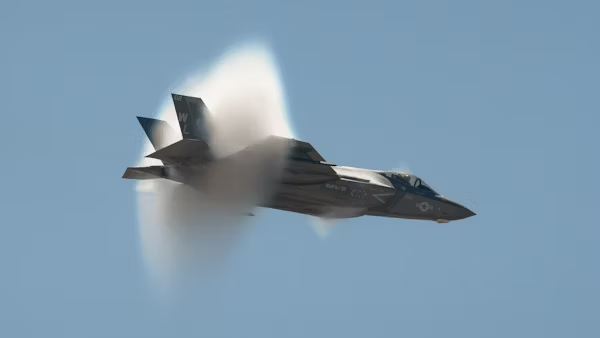
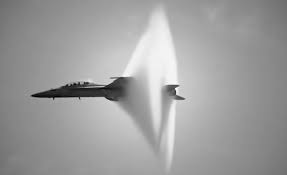
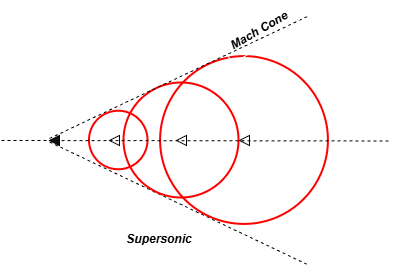
A classic visual example is the Mach Cone created by a supersonic jet. The sharp, V-shaped lines you see are concentrated shock waves.
The CFD Challenge: Smearing a Cliff Face
From a CFD perspective, a shock wave is a nightmare. The Navier-Stokes equations assume properties change smoothly, but a shock is a near-instantaneous jump. Capturing this sharp discontinuity on a computational mesh is the ultimate challenge.
If your CFD setup isn’t right, the shock will look more like a smooth, smeared-out hill than a sharp cliff. This leads to inaccurate results for drag, heating, and engine performance.
How to Capture Shock Waves Accurately in CFD: A 4-Step Guide
Accurate shock capturing isn’t about one magic setting; it’s about a combination of key choices.
1. Choose the Right Solver: Go Density-Based
This is non-negotiable. The Density-Based solver in ANSYS Fluent is explicitly designed for compressible flows with shocks. Its coupled approach solves the flow equations together, making it inherently better at handling the strong interdependence of variables across the shock.
Recap: The Pressure-Based solver is great for incompressible and mildly compressible flow, but for strong shocks, the Density-Based solver is the superior tool.
2. Mesh is King: Refine, Refine, Refine
The mesh is your most powerful tool for capturing shocks. A shock can only be as sharp as your mesh allows.
- Strategy: Use Adaptive Mesh Refinement (AMR). This technique allows the solver to automatically refine the mesh in regions of high gradients (i.e., where the shock is).
- How it works: You run the simulation, the solver identifies where the solution is changing rapidly, and it adds more cells in that specific location. This puts your computational resources exactly where they are needed most.
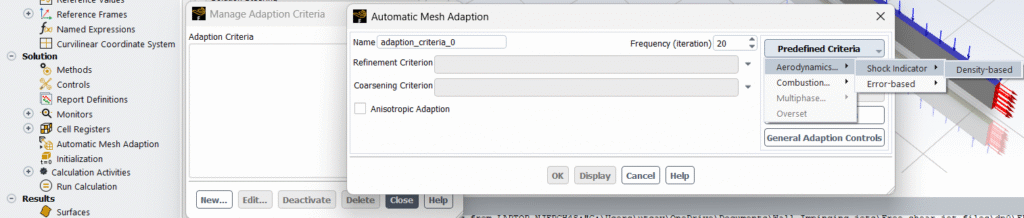
3. Select a Shock-Capturing Discretization Scheme
The numerical scheme determines how the flow variables are calculated between cell centers. For shocks, you need a scheme that can handle sharp jumps without causing unphysical oscillations (wiggles).
- The Go-To Choice: Second-Order Upwind schemes are a good baseline, but they can oscillate near shocks.
- The Gold Standard: Use a High-Resolution Scheme or enable Flux Limitors. These schemes are designed to be second-order accurate in smooth regions of the flow but automatically reduce to first-order accuracy near a shock. This first-order behavior is more stable and prevents oscillations, giving you a sharp, clean shock profile.
4. Set Physically Realistic Models and Conditions
- Material Model: You must use an Ideal Gas model for density. A constant density assumption will completely fail.
- Energy Equation: The Energy equation must be turned on. Shocks convert kinetic energy into thermal energy, causing a significant temperature rise.
- Boundary Conditions: For external supersonic flows, use Pressure-Far-Field boundaries where you can directly specify the Mach number. This is more physically correct than velocity inlets for these cases.
A Practical ANSYS Fluent Workflow for Shock Capturing
- Start Coarse: Begin with a reasonably coarse mesh and the Density-Based solver.
- Set Models: Enable the Energy Equation and select Ideal Gas for density.
- Choose Scheme: Use a Second-Order Upwind scheme with a Flux Limiter (e.g., Barth-Jespersen).
- Run and Adapt: Run the simulation until it is partially converged, then use the Adaption tool based on Pressure Gradient or Density Gradient to flag cells for refinement.
- Refine and Continue: Adapt the mesh, and continue the calculation. You should see the shock sharpen significantly.
The Bottom Line
Capturing a shock wave in CFD is a deliberate process. It requires:
- The Density-Based Solver.
- A sufficiently refined mesh, ideally using adaption.
- A shock-capturing numerical scheme.
- Physically correct models for compressible flow.
When you get it right, seeing that crisp, physical shock wave appear in your results is one of the most satisfying moments in computational aerodynamics.
Have you struggled with oscillating or smeared shocks in your simulations? What techniques have worked for you? Share your experiences in the comments below!
Further Reading: